See every litre.
The WaterMeterKit reads your analogue water meter, litre by litre. You see your use and the current flow in Home Assistant, in the SmartHomeShop app, or in both.

Will it fit your water meter?
The universal holder fits most European analogue water meters. The sensor reads the metal 1-litre indicator of your meter; you never touch the water pipe.
Your water meter
The water sensor sits on your analogue water meter with the universal holder and counts every litre. It fits most European meters; these are the most common ones.


How to mount the water sensor
Three short videos for the most common water meters. Mounting takes about a minute.
-

Type 1, Itron / Actaris / Schlumberger
-
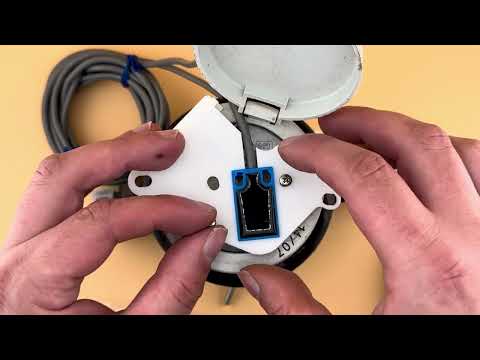
Type 2, Sensus
-

Type 3, Elster / Honeywell
- Power
- Through USB-C. Add the power set with a 3 metre cable when you order.
- Network
- WiFi 2.4 GHz at the water meter, or Thread with the Thread firmware. The WaterMeterKit has no Ethernet; if you need a cable, look at the WaterP1MeterKit.
- Distance
- The water sensor sits on a separate 3 metre cable, so you can mount the kit where your WiFi is strongest.
Not sure about your water meter? Send us a photo and we will check it. Send a photo
Your water in the SmartHomeShop app
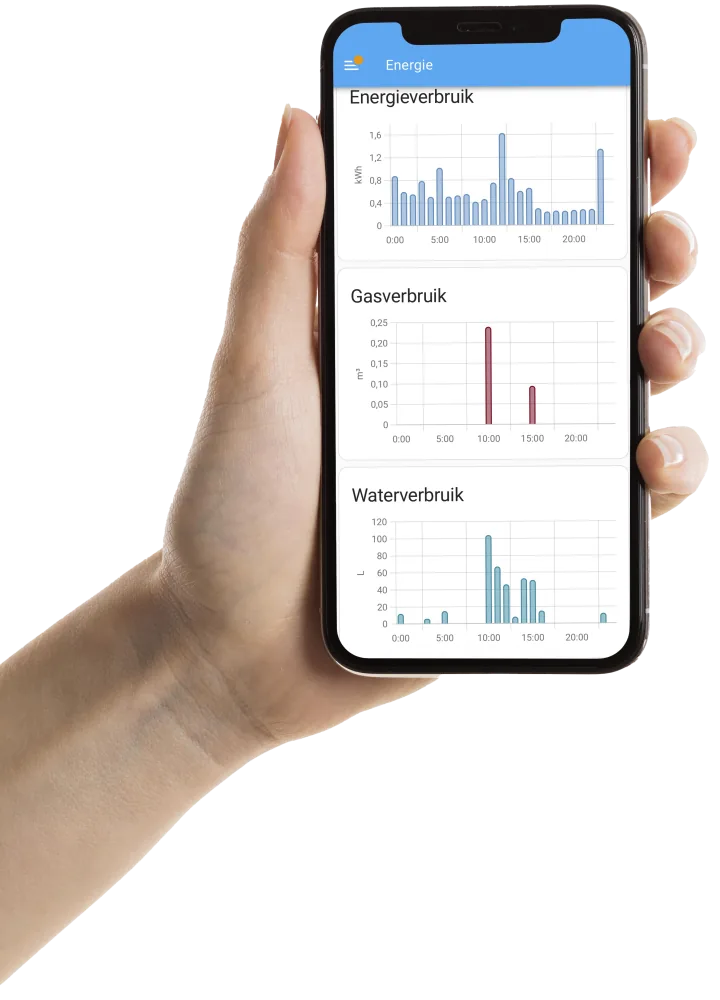
No Home Assistant? With cloud firmware you see your water use in our app, in the browser on your phone, tablet or computer, at home or away.
Sample data
Today
Water0,20 m³
This month
Water4,6 m³
This year
Water81 m³
Live Graphs
Last 3 hours · Updates every 10 seconds
Live water flowWater
0,0 L/min
Last 3 hours · new reading every 10 seconds
Connection status
Uptime 100.0%
Sample data
Trends
30 days- Water
- 8.47 m³
Average water usage
m³ per hour of the day
Compare
Months| Differences per metric | September 2026 | August 2026 | Difference |
|---|---|---|---|
| Water | 8.74 m³ | 9.80 m³ | 10.8% |
| Data points | 25,902 | 26,784 | 3.3% |
The number of data points differs per period.
Sample data
Alerts
-
Possible water leakHigh water flow
> 10 L/min
Not triggered yet
-
Daily water usageHigh daily water usage
> 0.5 m³
Last triggered: 5 days ago
Recent activity
Daily water usage: 0.62 m³ (> 0.50 m³)
What the email looks like
SmartHomeShop.ioDaily water usage - Meter cupboard
Daily water usage
An alert was triggered on your device Meter cupboard.
Measured value: 0.62 m³
Threshold: > 0.50 m³
Quick presets
- Water leakTriggers on water detection
- Possible water leak> 10 L/min
- Device offline> 5 min
Send via
- Push notifications Coming soon
- The current flow, in litres per minute
- Water use per day, week, month and year
- Email when the flow is high, possibly a leak
- Email when daily use is high
- Free account: dashboard, live data and 12 months of history
- Average water use per hour of the day
- Total water use for the chosen period
- Pick a week, 30 days, this or last month, this year or your own dates
- Put two days, months or years side by side, with the difference in percent
- Email on high flow, above 10 L/min by default
- Email on high daily use, above 0.5 m³ by default
- With a connected leak sensor: an email as soon as it detects water
- An alert when the meter is offline for more than 5 minutes
- Free: 1 alert per device. Plus gives you 20, Pro unlimited.
Home Assistant, our app or both
Use WaterMeterKit with Home Assistant, the SmartHomeShop cloud app or both at the same time. With compatible firmware, you can combine local dashboards and automations with remote access to your readings in our app.

Locally with Home Assistant
With local ESPHome firmware, readings go straight to Home Assistant. No SmartHomeShop account or cloud subscription is required.
- Current water flow and meter readings in Home Assistant.
- Track water use and create alerts for unusual or prolonged consumption.

Through the SmartHomeShop app
No Home Assistant needed. Open our cloud app in a browser on your phone, tablet or computer, even when you are away from home.
- View the latest water reading, flow rate and cumulative use.
- Explore water history and compare consumption across periods.
- Set email alerts for supported water readings.
Cloud use requires an account, internet and cloud firmware that supports your model. Readings and features depend on hardware and firmware; history and usage limits depend on your app plan. With supported firmware, you can also use the app and Home Assistant together.
Find the right firmwareWhich water kit do you need?
All three work with Home Assistant and our app. Pick what you want to measure.
-
WaterMeterKit
This pageWater use of your whole home, via your water meter
€55.00 incl. 21% VAT
Buy the WaterMeterKit -
WaterP1MeterKit
Water plus electricity and gas, with WiFi or Ethernet and PoE
€70.00 incl. 21% VAT
See the difference -
WaterFlowKit
Per tap, pipe or heating circuit, with up to 4 flow sensors
€58.00 incl. 21% VAT
View the WaterFlowKit

What’s in the box?
- WaterMeterKit with WiFi
- Separate water sensor with 3 metre cable
- Universal holder with screws for your water meter
Optional
- USB-C cable (3 m) and power adapter
Ready in 3 steps, under 2 minutes
Mount the holder, connect the power and link the kit to Home Assistant or the SmartHomeShop app.
Place the universal holder
Click the universal holder onto your water meter. Fits most European analog meters.
Power and WiFi
Connect the USB-C power and join the kit to your WiFi (2.4 GHz).
Connect to Home Assistant or the app
In Home Assistant: Settings → Devices & Services → Integrations.
- ESPHome: the WaterMeterKit usually appears automatically. Click Configure and follow the steps.
- Energy Dashboard: Settings → Dashboards → Energy; add the water use of the kit.
- SmartHomeShop app: install the cloud firmware from our firmware page and add the kit at app.smarthomeshop.io/start.
Water in the Home Assistant Energy Dashboard
Home Assistant finds the WaterMeterKit on your network through ESPHome. Your water use goes straight into the Energy Dashboard, and every reading is ready for your own automations. Your data stays in your own network.
- Water per litre, plus the current flow
- An alert when water keeps running, with an automation
- Use per hour, day, month and year
- Temperature and humidity at the meter
Open Source and 100% Local with ESPHome
The firmware is built on ESPHome and can be customized. With local firmware you use Home Assistant without depending on the cloud. Choose matching cloud firmware for our optional app.
- Fully Open Source
- All source code is available on GitHub. Customize the firmware to your needs.
- Built on ESPHome
- Runs on ESPHome, the most popular open-source IoT platform. OTA updates, no cloud needed.
- 100% Local & Private
- With local firmware, your readings stay within your own network, with no mandatory cloud or subscription.
# WaterMeterKit, ESPHome package
substitutions:
  name: watermeterkit-a1b2c3
  friendly_name: WaterMeterKit a1b2c3

packages:
  smarthomeshop.watermeterkit:
    url: https://github.com/smarthomeshop/watermeterkit
    ref: main
    files: [watermeterkit-v3/watermeterkit.yaml]

esphome:
  name: ${name}
  friendly_name: ${friendly_name}

api:
wifi:
Customer Reviews
4,9
Based on reviews
Product rating distribution
- star reviews
 4.8 on Google · General business rating
Share your thoughts
If you've used this product, share your thoughts with other customers
Write a reviewThe 10 latest reviews
-
Google
Translated from Dutch Original (Dutch)
Frequently Asked Questions
Answers to the questions we get most about the WaterMeterKit.
-
In most cases, yes. The WaterMeterKit is designed to fit most common analog water meters from well-known brands. We recommend always checking our list of compatible water meters, currently, we support: Actaris, DH Metering, Diehl (with a special clip-on holder), Elster, Hidroconta, Honeywell, Itron, Maddalena, Schlumberger, Sensus, and Zenner.
-
Installation is simple. Place the provided adapter on your water meter, connect the kit to wifi, and Home Assistant will automatically detect the device.
-
Absolutely. With the WaterMeterKit, you can track your water consumption by the hour, day, month, and year and compare it in clear charts.
-
Yes. The WaterMeterKit has a built-in Thread radio. With the Thread firmware it joins your existing Thread network and talks to Home Assistant locally through your Thread border router, without WiFi. Because it sends little data, the WaterMeterKit is a great fit for Thread. Our guide shows you step by step how to set it up.
-
No. Like Zigbee, Thread uses the 2.4 GHz band, but it is a different protocol. You don't pair the WaterMeterKit as a Zigbee device; it connects through your Thread border router.
-
Certainly! The WaterMeterKit provides real-time insight into your water consumption, allowing you to see how much water you use in daily activities directly.
-
The WaterMeterKit works with Home Assistant through ESPHome, locally and without a subscription. No Home Assistant? Use our SmartHomeShop app with cloud firmware, an account and internet. You can also use both at the same time.
-
No, the installation is designed to be simple. The included instructions will guide you step by step.
-
Yes. With the Thread firmware you don't need WiFi. Thread works locally with Home Assistant; if you want to use the SmartHomeShop app, choose the WiFi firmware. If you switch between WiFi and Thread firmware through the Device Builder, your meter total stays on the kit. The web flasher returns the kit to factory settings, so write your total down first.
-
A Thread border router, for example Home Assistant with a Connect ZBT-1 or SkyConnect, an existing Thread network and the ESPHome Device Builder. You install the Thread firmware on the kit over USB-C the first time.
Still have questions? Get in touch with us
Contact UsTechnical Specifications
- Connection to Water Meter
Direct connection with a universal holder that mounts the water sensor on the 1-liter metal indicator of your water meter.
- Network Connection
- Wi-Fi IEEE 802.11 b/g/n (2.4 GHz), supports WPA2/WPA3 security.
- Thread via the built-in IEEE 802.15.4 radio, with the Thread firmware and a Thread border router.
- Data Transmission
One update per liter of water
- Physical Dimensions of the Kit
92 x 47.5 x 26.5 mm
- Cable Length
- USB-C cable: 3 meters for powering the WaterMeterKit (if chosen).
- Detachable WaterMeterSensor cable: 3 meters.
- Power Supply
USB-C port for power supply (5V, 1A) with included USB adapter (if chosen)
- Operational Classification
IP20 (suitable for indoor use)
- Temperature Range
Operational from -10 °C to +40 °C
- Compatibility
Compatible with most European analog water meters, see the list on our website. If in doubt, contact us.
- Software
Fully integrated with Home Assistant through ESPHome. Ships with WiFi firmware; you install the Thread firmware with the ESPHome Device Builder.
- Includes
Universal water meter holder with screws for easy installation
Choose your meter kit.
Water only, energy only or both: there is always a kit that fits your meters.
|
Water |
WaterP1 |
P1 |
|
|---|---|---|---|
| Home Assistant | Yes | Yes | Yes |
| SmartHomeShop app | Yes | Yes | Yes |
| DSMR Reader | No | Yes | Yes |
| Open-source ESPHome firmware | Yes | Yes | Yes |
| Energy | |||
| Electricity use and solar export | No | Yes | Yes |
| Gas, via your smart meter | No | Yes | Yes |
| Power, voltage and current per phase | No | Yes | Yes |
| Water | |||
| Water use per litre | Yes | Yes | No |
| Current flow rate | Yes | Yes | No |
| Alert when water keeps running | Yes | Yes | No |
| Separate water sensor with 3 m cable | Yes | Yes | No |
| Leak sensor at the meter | No | With the optional leak sensor | No |
| Connectivity | |||
| WiFi 2.4 GHz | Yes | Yes | Yes |
| Ethernet | No | Yes | No |
| Thread | Yes | Yes | Yes |
| Power supply | |||
| USB-C | Yes | Yes | Yes |
| Power over Ethernet (PoE) | No | Yes | No |
| Via the P1 port (DSMR 5) | No | No | Yes |
| Extras | |||
| Temperature and humidity | Yes | Yes | Yes |
| Expansion port for an extra sensor | No | Yes | No |
|
= With the optional leak sensor Thread: with the Thread firmware the kit works without WiFi, locally with Home Assistant through your Thread border router. How to set up Thread |
Buy the WaterMeterKit | View the WaterP1MeterKit | View the P1MeterKit |
= With the optional leak sensor
Thread: with the Thread firmware the kit works without WiFi, locally with Home Assistant through your Thread border router. How to set up Thread
Make your water meter talk.
One kit on your water meter and you see every litre in Home Assistant, in our app, or in both.
€55.00 incl. 21% VAT
In stock
Back-order
Out of stock
